
Place the Keycaps completion
Ordered path from a cold join to a finished board and Sorted All Keycaps. Merge controls proof, group sorting, layout anchors, and a final sweep. Skip a phase only when its exit condition is already true. Read this /completion/ guide once, then practice the short checklist at the bottom on a cold join before you try a full Sorted All Keycaps run. Practice the short checklist at the bottom of /completion/ on a cold join before a full badge attempt. Use the practice block at the bottom of /completion/ before a full badge run.
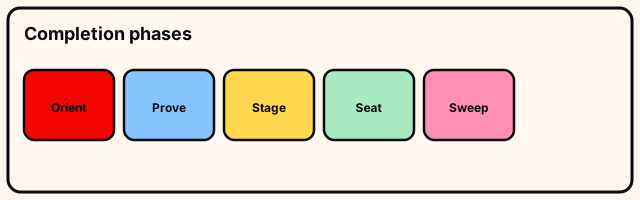
Phase 1 — Orient
Join, wait for board and pile to stream, note the live title if you care about patch brackets, keep permanent name Place the Keycaps in notes. On /completion/ step “Phase 1 — Orient”,. Start “Phase 1 — Orient” by reading silhouettes on /completion/ before touching the pile.
Circle the board. Identify Spacebar, Enter, Shifts, side clusters. Set a staging corner. Exit when you can point to major regions without picking anything up. For “Phase 1 — Orient”, a. Mid “Phase 1 — Orient”: one pickup or throw at a time on /completion/ so mistakes reverse cleanly.
- Phase 1 — Orient: check
- Phase 1 — Orient: stage
- Phase 1 — Orient: next
Phase 1 — Orient depends on what the live Place the Keycaps board shows for that cluster on /completion/ during this beta build. Exit “Phase 1 — Orient” on /completion only when this cluster’s leftovers are labeled or gone.
Phase 2 — Prove controls
Pick a clear legend. Place if obvious, or Q-throw to staging. Ctrl-unlock and reframe. Exit when Q and Ctrl both worked once. On /completion/ step “Phase 2 — Prove controls”,. Start “Phase 2 — Prove controls” by reading silhouettes on /completion/ before touching the pile.
If either fails, fix focus/settings before sorting—sorting without throw is misery. For “Phase 2 — Prove controls”, a. Mid “Phase 2 — Prove controls”: one pickup or throw at a time on /completion/ so mistakes reverse cleanly.
- Phase 2 — Prove controls: check
- Phase 2 — Prove controls: stage
- Phase 2 — Prove controls: next
Leave “Phase 2 — Prove controls” on /completion/ after you have scanned that cluster once at mid zoom and once at close zoom. Exit “Phase 2 — Prove controls” on /completion only when this cluster’s leftovers are labeled or gone.
Phase 3 — Stage pure groups
Pull letters, numbers, function, modifiers, nav, arrows, and specials into separate piles with Q. Seat only accidental perfect matches. On /completion/ step “Phase 3 — Stage pure groups”,. Start “Phase 3 — Stage pure groups” by reading silhouettes on /completion/ before touching the pile.
Exit when the mixed pile is mostly gone and each staging pile has a name (and an owner in co-op). For “Phase 3 — Stage pure groups”, a. Mid “Phase 3 — Stage pure groups”: one pickup or throw at a time on /completion/ so mistakes reverse cleanly.
- Phase 3 — Stage pure groups: check
- Phase 3 — Stage pure groups: stage
- Phase 3 — Stage pure groups: next
Leave “Phase 3 — Stage pure groups” on /completion/ after you have scanned that cluster once at mid zoom and once at close zoom. Exit “Phase 3 — Stage pure groups” on /completion only when this cluster’s leftovers are labeled or gone.
Phase 4 — Seat by region
Order: oversized specials and Spacebar → letters → numbers → function → modifiers → nav → arrows. Match legend and width every time. On /completion/ step “Phase 4 — Seat by region”,. Start “Phase 4 — Seat by region” by reading silhouettes on /completion/ before touching the pile.
Exit when staging piles are empty or reduced to true unknowns that stay staged, never forced. For “Phase 4 — Seat by region”, a. Mid “Phase 4 — Seat by region”: one pickup or throw at a time on /completion/ so mistakes reverse cleanly.
- Phase 4 — Seat by region: check
- Phase 4 — Seat by region: stage
- Phase 4 — Seat by region: next
Leave “Phase 4 — Seat by region” on /completion/ after you have scanned that cluster once at mid zoom and once at close zoom. Exit “Phase 4 — Seat by region” on /completion only when this cluster’s leftovers are labeled or gone.
Phase 5 — Correct and sweep
Fix left/right modifier swaps first. Hunt empty silhouettes from high camera. Perimeter-walk for thrown stragglers. On /completion/ step “Phase 5 — Correct and sweep”,. Start “Phase 5 — Correct and sweep” by reading silhouettes on /completion/ before touching the pile.
Exit when no empty seats, no floor leftovers, and badge/completion feedback appears—or re-scan if neither does. For “Phase 5 — Correct and sweep”, a. Mid “Phase 5 — Correct and sweep”: one pickup or throw at a time on /completion/ so mistakes reverse cleanly.
- Phase 5 — Correct and sweep: check
- Phase 5 — Correct and sweep: stage
- Phase 5 — Correct and sweep: next
Leave “Phase 5 — Correct and sweep” on /completion/ after you have scanned that cluster once at mid zoom and once at close zoom. Exit “Phase 5 — Correct and sweep” on /completion only when this cluster’s leftovers are labeled or gone.
Honest speed and aftercare
Batch throws, zoom for legends, and one group owner in co-op beat four people fighting Spacebar. Do not publish guaranteed minute claims in beta. On /completion/ step “Honest speed and aftercare”,. Start “Honest speed and aftercare” by reading silhouettes on /completion/ before touching the pile.
Community videos are pacing only. Official Roblox media API had no trailer when checked 2026-07-16. For “Honest speed and aftercare”, a. Mid “Honest speed and aftercare”: one pickup or throw at a time on /completion/ so mistakes reverse cleanly.
- Honest speed and aftercare: check
- Honest speed and aftercare: stage
- Honest speed and aftercare: next
Honest speed and aftercare depends on what the live Place the Keycaps board shows for that cluster on /completion/ during this beta build. Exit “Honest speed and aftercare” on /completion only when this cluster’s leftovers are labeled or gone.
Try this before you leave
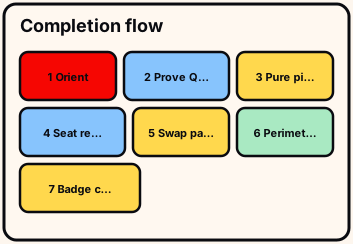
Phase 1: orient without pickup. Phase 2: prove Q and Ctrl once.
Phase 3: pure piles. Phase 4: seat by region with width checks.
- phases 1–5 exits
Phase 5: modifier swaps, empty silhouettes, perimeter, badge/status.
If phase 5 fails twice, rejoin once, then max-zoom perimeter before claiming soft-lock.
/completion/ drill stays under three minutes on a cold join.
Two different-day passes graduate /completion/ better than one warm retry.
Completion practice ends when phase exits hold. Independent wiki. /completion/ official description wins after rebinds; no invented codes; full clear still needed for Sorted All Keycaps.
Optional community example
Optional community pacing example for Place the Keycaps—not an official KEYBOARDS!!!!! trailer and not a guarantee that seats match your beta build. Published by (Community, 2026-07, ~1h).
- Watch only after Q throw and Ctrl mouse unlock work on your device
- Treat on-screen layouts in the video as historical, not permanent
- Return to the live board for empty-seat decisions
The uploader is independent of KEYBOARDS!!!!! and Roblox. Prefer the official experience description when it conflicts with the recording.
Community · Place the Keycaps long play · ~1h · Open on YouTube
Community video, not an official KEYBOARDS!!!!! upload. Published 2026-07; live-game details may change after an update. Optional watch only.