
Place the Keycaps checklist
Use this checklist to hunt missing groups after the main sort. Tick a group only when that region has no empty silhouette and no floor leftovers for it. The badge still needs a fully correct board—ticks find holes; they do not grant Sorted All Keycaps. Read this /checklist/ guide once, then practice the short checklist at the bottom on a cold join before you try a full Sorted All Keycaps run. Practice the short checklist at the bottom of /checklist/ on a cold join before a full badge attempt.
How to run the checklist
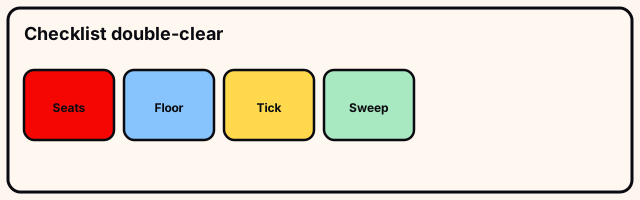
Mid zoom, scan left-to-right top-to-bottom, naming groups. Tick only when seats and floor leftovers for that group are both clear. On /checklist/ step “How to run the checklist”,. Start “How to run the checklist” by reading silhouettes on /checklist/ before touching the pile.
Early ticks are how players “finish” with one punctuation key under the table. Leave groups unchecked until both conditions hold. For “How to run the checklist”, a. Mid “How to run the checklist”: one pickup or throw at a time on /checklist/ so mistakes reverse cleanly.
- How to run the checklist: check
- How to run the checklist: stage
- How to run the checklist: next
Leave “How to run the checklist” on /checklist/ after you have scanned that cluster once at mid zoom and once at close zoom. Exit “How to run the checklist” on /checklist only when this cluster’s leftovers are labeled or gone.
Function and number groups
Confirm Esc and the F-strip. Small caps hide under large specials—lift staging plates if the strip has holes. On /checklist/ step “Function and number groups”,. Start “Function and number groups” by reading silhouettes on /checklist/ before touching the pile.
Confirm 1–0, number-row symbols, and Backspace. Missing wide keys are usually mis-staged, not deleted from the universe. For “Function and number groups”, a. Mid “Function and number groups”: one pickup or throw at a time on /checklist/ so mistakes reverse cleanly.
- Function and number groups: check
- Function and number groups: stage
- Function and number groups: next
Function and number groups depends on what the live Place the Keycaps board shows for that cluster on /checklist/ during this beta build. Exit “Function and number groups” on /checklist only when this cluster’s leftovers are labeled or gone.
Letter rows
Tick top, home, and bottom letter rows separately. A single missing P or M is the classic false complete. On /checklist/ step “Letter rows”,. Start “Letter rows” by reading silhouettes on /checklist/ before touching the pile.
Read empty outlines first, then search the floor—floor-first seating fills the wrong remaining hole. For “Letter rows”, a. Mid “Letter rows”: one pickup or throw at a time on /checklist/ so mistakes reverse cleanly. Staging during “Letter rows” on /checklist keeps the mixed pile from re-absorbing finished work.
- Letter rows: check
- Letter rows: stage
- Letter rows: next
Letter rows depends on what the live Place the Keycaps board shows for that cluster on /checklist/ during this beta build. Exit “Letter rows” on /checklist only when this cluster’s leftovers are labeled or gone.
Modifiers, nav, arrows
Tick modifiers only after left/right pairs match by width. Enter and Spacebar belong with specials if not already counted. On /checklist/ step “Modifiers, nav, arrows”,. Start “Modifiers, nav, arrows” by reading silhouettes on /checklist/ before touching the pile.
Nav and arrows when present: directions for arrows, block placement for nav. Absent clusters are N/A, not incomplete. For “Modifiers, nav, arrows”, a. Mid “Modifiers, nav, arrows”: one pickup or throw at a time on /checklist/ so mistakes reverse cleanly.
- Modifiers, nav, arrows: check
- Modifiers, nav, arrows: stage
- Modifiers, nav, arrows: next
Modifiers, nav, arrows depends on what the live Place the Keycaps board shows for that cluster on /checklist/ during this beta build. Exit “Modifiers, nav, arrows” on /checklist only when this cluster’s leftovers are labeled or gone.
Final sweep and next steps
Walk a rectangle around board and original pile footprint: walls, under large staged caps, prior Q landings. On /checklist/ step “Final sweep and next steps”,. Start “Final sweep and next steps” by reading silhouettes on /checklist/ before touching the pile.
No badge after a “perfect” look means a hole remains. Re-scan before rage-quitting or reinstalling. For “Final sweep and next steps”, a. Mid “Final sweep and next steps”: one pickup or throw at a time on /checklist/ so mistakes reverse cleanly.
- Final sweep and next steps: check
- Final sweep and next steps: stage
- Final sweep and next steps: next
Leave “Final sweep and next steps” on /checklist/ after you have scanned that cluster once at mid zoom and once at close zoom. Exit “Final sweep and next steps” on /checklist only when this cluster’s leftovers are labeled or gone.
Try this before you leave
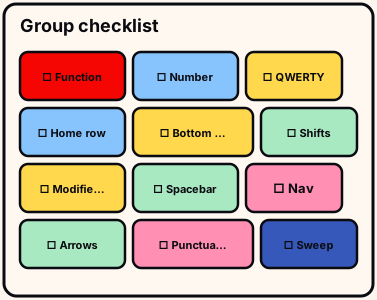
Tick only double-clear groups: seats empty of gaps and floor clear of that group’s leftovers.
Order: function/number, letters, modifiers/nav/arrows, perimeter walk last.
- double-clear ticks
Photograph once if pride claims finish—photos catch F-key holes.
Co-op: neutral final scan after owners self-tick.
/checklist/ drill stays under three minutes on a cold join.
Two different-day passes graduate /checklist/ better than one warm retry.
Checklist practice ends when ticks are honest. Independent wiki. /checklist/ official description wins after rebinds; no invented codes; full clear still needed for Sorted All Keycaps.