
Place the Keycaps sorting
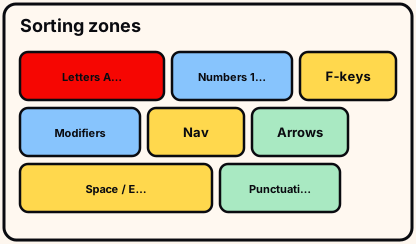
Sorting is faster when the mixed pile becomes pure groups before you fill seats. This guide uses letters, numbers, function keys, modifiers, navigation, arrows, and oversized specials as player staging groups—not a claim of a fixed factory inventory. Read this /sorting/ guide once, then practice the short checklist at the bottom on a cold join before you try a full Sorted All Keycaps run. Practice the short checklist at the bottom of /sorting/ on a cold join before a full badge attempt. Use the practice block at the bottom of /sorting/ before a full badge run.
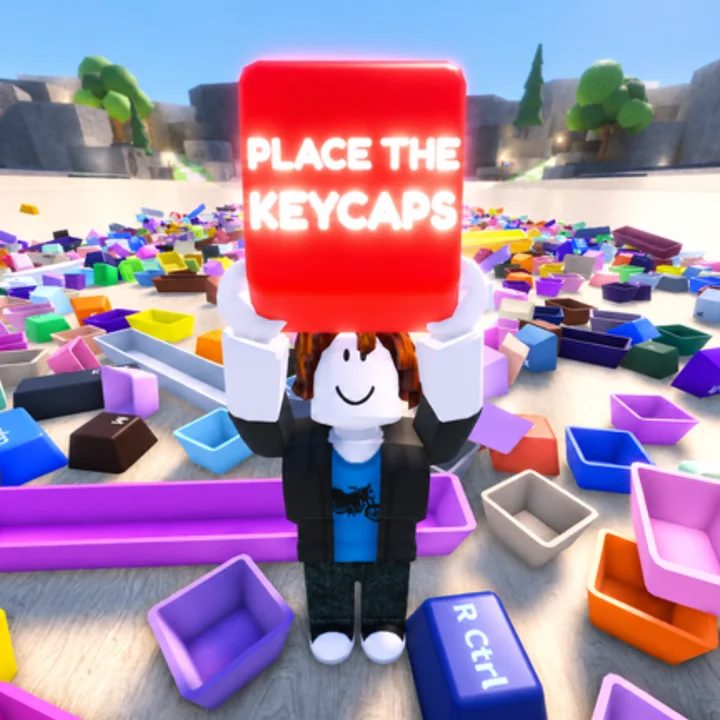
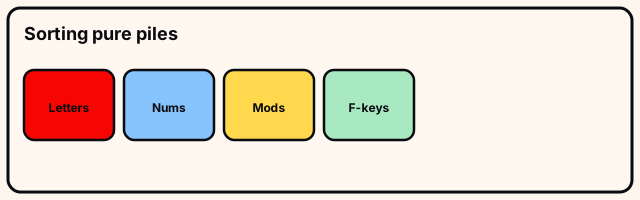
Group-first beats random grabs
Random grabs force a new spatial puzzle every pickup. Group-first staging means each seating pass only compares seats inside one board region. On /sorting/ step “Group-first beats random grabs”,. Start “Group-first beats random grabs” by reading silhouettes on /sorting/ before touching the pile.
Use Q to throw into floor zones you choose—corners, walls, or keyboard edges—and keep the same zones for the whole run. For “Group-first beats random grabs”, a. Mid “Group-first beats random grabs”: one pickup or throw at a time on /sorting/ so mistakes reverse cleanly.
- Group-first beats random grabs: check
- Group-first beats random grabs: stage
- Group-first beats random grabs: next
Group-first beats random grabs depends on what the live Place the Keycaps board shows for that cluster on /sorting/ during this beta build. Exit “Group-first beats random grabs” on /sorting only when this cluster’s leftovers are labeled or gone.
Letters and three rows
Pull A–Z into one staging area, then optionally split QWERTY, ASDF, and ZXCV rows if the empty board is hard to read from high camera. On /sorting/ step “Letters and three rows”,. Start “Letters and three rows” by reading silhouettes on /sorting/ before touching the pile.
Seat left-to-right after the left anchor is clear. Half-read legends stay staged until you can zoom and re-read them. For “Letters and three rows”, a. Mid “Letters and three rows”: one pickup or throw at a time on /sorting/ so mistakes reverse cleanly.
- Letters and three rows: check
- Letters and three rows: stage
- Letters and three rows: next
Letters and three rows depends on what the live Place the Keycaps board shows for that cluster on /sorting/ during this beta build. Exit “Letters and three rows” on /sorting only when this cluster’s leftovers are labeled or gone.
Numbers vs function strip
Keep 1–0 and number-row symbols separate from F1–F12. Mixing them causes empty seats that “should be filled.” On /sorting/ step “Numbers vs function strip”,. Start “Numbers vs function strip” by reading silhouettes on /sorting/ before touching the pile.
Place numbers left-to-right including Backspace’s wide seat. Stage F-keys early so they are not lost under Spacebar-sized plates. For “Numbers vs function strip”, a. Mid “Numbers vs function strip”: one pickup or throw at a time on /sorting/ so mistakes reverse cleanly.
- Numbers vs function strip: check
- Numbers vs function strip: stage
- Numbers vs function strip: next
Numbers vs function strip depends on what the live Place the Keycaps board shows for that cluster on /sorting/ during this beta build. Exit “Numbers vs function strip” on /sorting only when this cluster’s leftovers are labeled or gone.
Modifiers and oversized keys
Ctrl, Alt, Shift, Enter, Backspace, and Spacebar demand size matching. Left/right pairs are not interchangeable when widths differ. On /sorting/ step “Modifiers and oversized keys”,. Start “Modifiers and oversized keys” by reading silhouettes on /sorting/ before touching the pile.
Seat Spacebar early as a bottom-row landmark, then mirror modifiers outside-in. For “Modifiers and oversized keys”, a. Mid “Modifiers and oversized keys”: one pickup or throw at a time on /sorting/ so mistakes reverse cleanly.
- Modifiers and oversized keys: check
- Modifiers and oversized keys: stage
- Modifiers and oversized keys: next
Modifiers and oversized keys depends on what the live Place the Keycaps board shows for that cluster on /sorting/ during this beta build. Exit “Modifiers and oversized keys” on /sorting only when this cluster’s leftovers are labeled or gone.
Navigation, arrows, and pacing
Stage nav and arrows away from letters. Arrow bodies match—read direction. If the live board omits a cluster, do not invent seats. On /sorting/ step “Navigation, arrows, and pacing”,. Start “Navigation, arrows, and pacing” by reading silhouettes on /sorting/ before touching the pile.
Finish staging one group before seating another. Contaminated piles should be dumped and rebuilt. For “Navigation, arrows, and pacing”, a. Mid “Navigation, arrows, and pacing”: one pickup or throw at a time on /sorting/ so mistakes reverse cleanly.
- Navigation, arrows, and pacing: check
- Navigation, arrows, and pacing: stage
- Navigation, arrows, and pacing: next
Navigation, arrows, and pacing depends on what the live Place the Keycaps board shows for that cluster on /sorting/ during this beta build. Exit “Navigation, arrows, and pacing” on /sorting only when this cluster’s leftovers are labeled or gone.
Try this before you leave
Build letter, number, modifier, and special pure piles before seating anything optional.
Dump contaminated piles entirely. Seat one pure pile as proof of process.
- four pure piles
Co-op: assign group owners out loud once; no silent double staging.
Function keys get an early private pile so large specials stop burying them.
/sorting/ drill stays under three minutes on a cold join.
Two different-day passes graduate /sorting/ better than one warm retry.
Sorting practice ends when purity is visible at a glance. Independent wiki. /sorting/ official description wins after rebinds; no invented codes; full clear still needed for Sorted All Keycaps.